How To Fix Galaxy Ring Sizing Kit Calibration Errors?
Getting the right fit for your Galaxy Ring starts with the sizing kit. But what happens when the kit does not seem to work correctly?
Many users run into confusing moments during this process. A ring might feel too loose or too tight. Sometimes the checkout steps do not go as expected.
These issues often feel like calibration errors. In most cases, they are simple fit or process mix ups. Understanding how the sizing kit actually works helps you fix these problems fast.
This guide walks you through common sizing kit issues. You will learn why certain rings feel different than expected. You will also see why the actual Galaxy Ring may fit differently than the sample rings.
By the end, you will know how to spot real problems versus normal fit differences. You will feel confident ordering your correct size without guesswork or stress.
In a Nutshell
Choose “No, I don’t know my size” at checkout. This step adds the sizing kit to your cart automatically.
Follow the on screen steps carefully. Skipping instructions often causes confusion later.
Test all 11 sample rings before picking a size. Trying just one or two can lead to a poor fit.
Expect slight resistance over your knuckle. This is normal and shows a proper test fit.
Remember the kit rings feel tighter than the real device. The actual ring will not stick as firmly to your finger.
Watch for real mismatches. If the fit feels loose or too tight even after testing, that is a sign to try another size.
Order your ring only after confirming the best fit. This helps you avoid unnecessary exchanges.
What Is the Galaxy Ring Sizing Kit and How It Works
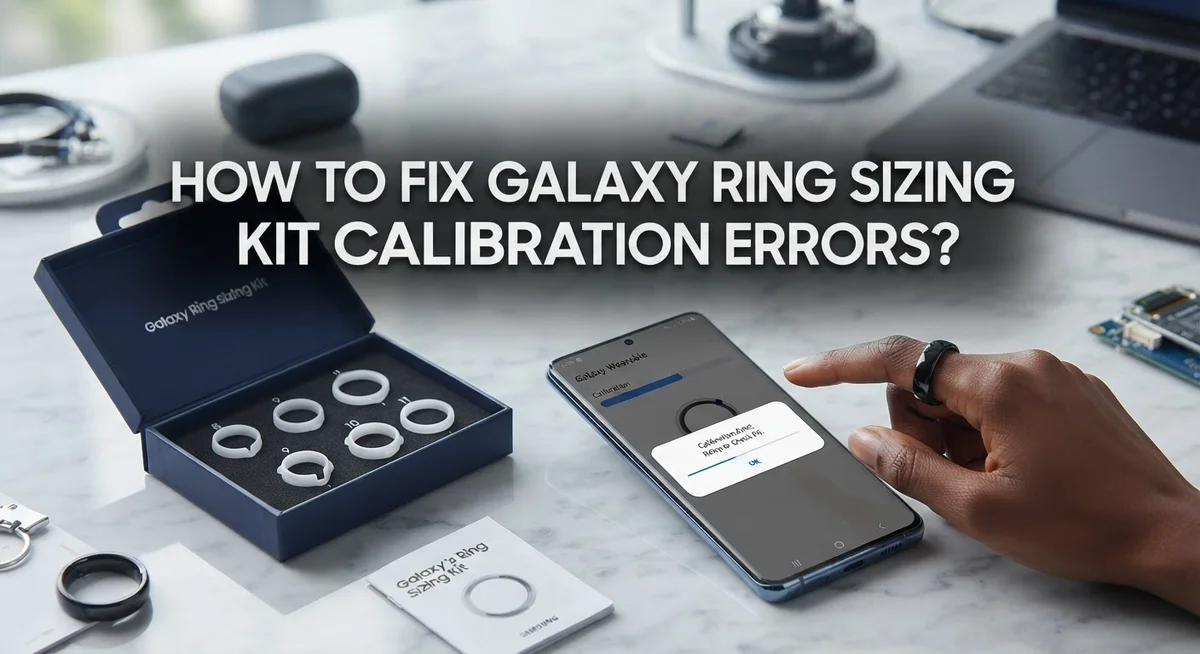
The Galaxy Ring sizing kit is a collection of 11 sample rings you receive before your actual device ships. This kit helps you find your perfect fit without guessing. Think of it as a physical try on experience delivered right to your door.
Here’s how the process works. When you order a Galaxy Ring, you select “No, I don’t know my size” during checkout. The sizing kit then automatically adds to your cart. You complete the purchase like normal. After you place your order, the sizing kit arrives first. You test each of the 11 sample rings on your finger.
The kit rings are designed to feel slightly different from your actual Galaxy Ring. They stick more firmly to your finger than the real device will. This is completely normal and expected. You should feel some resistance as you slide each ring over your knuckle. That resistance tells you the ring has a secure fit.
Test multiple sizes carefully before deciding. Don’t rush this step. Spend time wearing each sample ring to understand how it feels throughout the day. Notice which sizes feel comfortable and which feel too tight or too loose.
Once you’ve tested all 11 samples, you’ll have a clear answer about your correct size. You then confirm your choice, and the actual Galaxy Ring ships in that size. The real ring will feel slightly looser than the kit samples, which is normal.
Understanding this process helps you avoid confusion. Many people mistake the kit’s tighter feel for a calibration error. It’s just how sample rings work. The sizing kit exists to give you confidence before your real ring arrives.
Recognizing the Signs of a Calibration or Fit Error
When you first use your sizing kit, watch for specific signs that something isn’t working correctly. Real calibration errors feel different from normal fit confusion.
The most obvious sign is when the sample rings don’t slide over your knuckle at all, even with reasonable effort. Your finger shouldn’t require excessive force. If a ring gets stuck or causes pain, that’s a red flag. Move to the next size up immediately.
Another warning sign appears when the ring spins freely on your finger without any resistance whatsoever. A proper fit should have slight tension as you put it on. If it rotates like a loose bracelet, the size is too large for you.
Pay attention to how the rings feel throughout the day. Discomfort that increases over time suggests poor sizing. Your finger shouldn’t turn red or develop marks after wearing a sample ring for a few hours. Some minor marks are normal, but significant redness means the fit is too tight.
Listen for feedback from the sizing kit itself. If the ring doesn’t sit flush against your skin or wobbles side to side, you’re likely in the wrong size. The ring should feel stable and centered on your finger.
Temperature changes matter too. If your ring suddenly feels loose or tight as your body temperature changes, that indicates a marginal fit. Your correct size should remain comfortable in different conditions.
Document how each sample ring feels. Write down which sizes felt closest to right. This information helps you make the final decision with confidence. Don’t rely on memory alone when testing 11 different rings.
Step-by-Step Guide to Properly Testing Your Sizing Kit
Start by washing your hands with warm water and soap. Clean hands help you get accurate results because dirt and moisture won’t interfere with how the rings slide on your finger.
Find a quiet space where you can focus for about 15 to 20 minutes. You need good lighting so you can see each ring clearly. Sit down comfortably at a table or desk.
Begin with the smallest sample ring. Gently slide it onto your finger, starting with your index finger. Push it slowly over your knuckle. The ring should require slight resistance but shouldn’t cause pain or leave marks on your skin.
Once the ring sits on your finger, check how it feels. The fit should be snug but comfortable. You should be able to rotate it slightly without it spinning freely. A ring that spins too easily is too large. A ring that won’t move at all is too small.
Test each sample ring one at a time. Move through the sizes systematically, either going up or down depending on your first impression. Write down how each size feels so you don’t forget.
Wear each ring for a few minutes. This helps you understand how it performs during normal wear. Pay attention to whether it stays in one position or slides around.
Test on different fingers if needed. Some people have different sizes on different fingers, though most wear their ring on the same finger consistently.
Check the rings at different times of day. Your fingers may swell slightly in the afternoon or evening, which affects fit.
Record your observations for each size. This documentation helps you make your final decision with confidence.
How to Correctly Interpret Fit Results Before Ordering
When you receive your sizing kit, take time to understand what the fit results actually mean before placing your final order. The 11 sample rings help you identify your correct size, but interpreting the results requires careful attention.
Start by identifying your ideal fit sensation. Your ring should slide over your knuckle with slight resistance. You should feel a gentle grip around your finger, not a loose spin. The sample that requires moderate pressure to put on and comes off with a small tug is typically your correct size.
Pay close attention to how each sample ring behaves throughout the day. A properly sized ring maintains consistent contact with your skin without cutting off circulation. Your finger should not show any red marks or indentation after wearing the sample for several minutes.
Remember that sizing kit rings feel different from your actual device. The sample rings are thicker and stick more firmly to your finger than the real Galaxy Ring will. This means a size that feels snug in the kit might feel slightly looser once your actual ring arrives. Account for this difference when making your decision.
Document which size felt most comfortable during your testing period. Note any sizes that were too tight or too loose. Look for the sample that required reasonable effort to put on but didn’t cause discomfort or leave marks on your skin.
If multiple sizes felt similar, choose the slightly larger option. This approach helps prevent ordering a ring that becomes uncomfortable during normal wear or with slight finger swelling throughout the day.
Your fit results should guide you toward one clear size choice before checkout.
Tips for Getting an Accurate Sizing Kit Reading
Getting an accurate reading from your sizing kit requires careful attention to several practical factors. Start by testing your rings at consistent times of day, as finger size naturally fluctuates. Your fingers tend to be smallest in the morning and larger in the evening, so test multiple times for the most reliable results.
Make sure your hands are clean and dry before each test. Moisture or residue can change how the rings slide on your finger, giving you false readings. Wash your hands with warm water and soap, then wait a few minutes before testing.
Test each sample ring on the same finger you plan to wear your actual device on. Most people wear rings on their ring finger or index finger, so focus your testing there. However, you can also test on other fingers to understand how sizing works across your hand.
Wear each sample ring for at least five to ten minutes during normal activities. This helps you feel how it performs when you’re moving around, not just sitting still. Pay attention to whether it stays in place or spins too easily.
Take detailed notes about each size. Write down which rings felt comfortable, which were too tight, and which were too loose. This documentation helps you make a confident decision later.
Remember that the sample rings behave differently than your actual device. The sizing kit rings are thicker and grip your finger more firmly. This means your actual ring might feel slightly looser or more comfortable than the sample. Choose the size that felt best during your testing, knowing your final device may perform a bit differently.
Common Mistakes That Lead to Sizing Errors
Many people make simple mistakes when using their sizing kit. These errors can lead to ordering the wrong size for your actual device.
One major mistake is assuming the sizing kit fit perfectly matches your actual ring behavior. The sample rings in your kit are thicker and stick more firmly to your finger than the real device will. This difference means a size that felt snug with the kit might feel looser once your actual ring arrives. Keep this in mind when making your final decision.
Another common error is not testing multiple sizes before deciding. Some people try just one or two sample rings and think they have found their size. Testing all available options gives you a much better sense of what works for your finger. You gain confidence in your choice when you compare how different sizes feel throughout the day.
People also rush through the testing process. Your sizing kit needs real time and real wear. Spending just a few minutes with each ring is not enough. Wear each sample ring during normal activities for at least five to ten minutes so you understand how it actually performs.
Some users test on the wrong finger. Always test your sample rings on the exact finger where you plan to wear your actual device. Your ring finger might fit differently than your index finger, so this matters.
Finally, many people forget to document their observations. Writing down which sizes felt comfortable, too tight, or too loose helps you remember details later. Your notes become valuable when you are ready to place your final order and need to recall exactly how each size performed.
Troubleshooting Discrepancies Between Kit and Actual Ring Fit
When your sizing kit rings don’t match how your actual device fits, you’re experiencing a common calibration issue. The good news is this happens to many users and has straightforward solutions.
The main reason for discrepancies is material difference. Sizing kit samples are thicker and stickier than your final device. This means a ring that felt snug during testing might feel looser once you receive it. Your actual ring will slide more smoothly over your knuckle.
Start by reviewing your testing notes. Which size felt most comfortable during your trial period? That’s your baseline. If your actual ring feels too loose, you likely need to go down one size. If it feels too tight, consider going up one size.
Test the fit at different times of day. Your finger size changes throughout the day due to temperature, activity level, and hydration. Morning fingers are typically smaller than evening fingers. Check your ring fit when your hands are warmest and coldest to understand the full range.
Pay attention to the resistance level. Your ring should have slight resistance getting over your knuckle but slide smoothly once on your finger. Too much resistance means it’s too tight. Too little resistance means it might slip off during activity.
Document everything you notice about your actual ring’s behavior. Wear it during different activities and note any discomfort or movement. This real world data helps you understand if you truly have a sizing issue or if you simply need an adjustment period.
Contact support if your ring feels significantly different from your kit experience. They can help determine if you need to order a different size or if your current fit is normal.
What To Do If Your Ordered Ring Still Doesn’t Fit
If your ordered ring still doesn’t fit after using the sizing kit, don’t worry. This happens more often than you’d think, and there are practical steps to take.
First, wear your actual ring for several days before deciding it’s wrong. Your finger needs time to adjust to the device. The ring may feel different than the sizing kit samples because the actual device has different materials and weight. Give yourself at least a week of normal wear.
Next, test the fit at different times of day. Your fingers naturally change size throughout the day. Morning fingers are typically smaller than evening fingers. Temperature and activity level both affect how your ring sits. Test it when your hands are in different conditions to get a true sense of the fit.
Pay close attention to how the ring moves on your finger. Some movement is normal and actually helps the device work better. If the ring spins too freely or cuts off circulation, that’s when you need to act.
Document exactly what feels wrong. Is it too tight at the knuckle? Does it slide around too much? Is it uncomfortable during specific activities? Write these details down clearly.
Contact support with your specific concerns and testing observations. Explain how the actual ring differs from your sizing kit experience. Include information about when the fit feels worst and what you’ve already tried.
Support can often help you find solutions before considering a replacement. They may suggest wearing adjustments or confirm that a different size would work better. Keep your documentation handy when you reach out. Clear details help them assist you faster and more effectively.
Final Thoughts
Fixing sizing kit calibration errors comes down to patience and careful testing. Your Galaxy Ring experience starts with getting this step right.
The sizing kit gives you 11 sample rings. This range helps you find your true fit before buying the actual device.
Take your time with each sample. Rushing through this process causes most sizing problems. Give yourself several days if needed.
Slight resistance over your knuckle is normal. This resistance means the ring fits correctly. Don’t confuse this with a ring that’s too tight.
Remember that kit samples feel different from your actual ring. The materials aren’t identical. Your final device will feel less sticky and more comfortable over time.
Trust your testing notes more than your first impression. Write down details as you test each size. These notes become valuable if problems come up later.
Calibration errors often happen because people skip steps. Following the on-screen checkout directions matters. Each step exists to help you get an accurate size.
If you notice a mismatch between your kit experience and your actual ring, don’t panic. This happens sometimes. Support teams understand this issue well.
Testing multiple sizes always beats guessing. Even if one ring feels close, try the sizes above and below it too. This comparison helps you feel confident in your final choice.
Good calibration takes a bit of effort upfront. But it saves you time and frustration later. A properly sized ring feels comfortable, tracks accurately, and stays secure during daily wear.
Take these steps seriously. Your comfort and the ring’s performance depend on getting this right from the start.
Frequently Asked Questions
Why does my sizing kit feel different from my actual Galaxy Ring?
The sizing kit contains sample rings made from different materials than your final device. Kit samples are thicker and stickier, so they grip your finger more firmly. Your actual ring will slide on and off more smoothly. This is completely normal and expected behavior.
Should I test multiple sizes even if one feels perfect?
Yes, you should. Testing several sizes helps you understand how the ring feels at different tightness levels. Try at least 2 or 3 sizes around your predicted fit. This gives you confidence in your final choice and reduces surprises when your actual ring arrives.
When is the best time to test my sizing kit?
Test your kit at different times throughout the day. Your finger size changes based on temperature, activity level, and time of day. Morning fingers are often smaller than evening fingers. Testing multiple times gives you the most accurate picture of how your ring should fit.
What does proper sizing kit fit actually feel like?
Your ring should have slight resistance when sliding over your knuckle. This gentle resistance means the fit is secure without being too tight. The ring should sit comfortably on your finger without rotating or sliding around. If it falls off easily, try the next size up.
What should I do if my kit and actual ring fit differently?
Wear your actual ring for several days before deciding something is wrong. Document how it feels at different times of day. Note any movement or discomfort you experience. If problems persist after this testing period, contact support with your specific observations.

Hi, I’m Amy! I’m passionate about tech and love breaking down complex product specs into simple, actionable advice. I review gadgets, compare tools, and write buying guides to help you spend smarter. Got a question? Drop me a message — I’d love to hear from you!